

What is economic indicator backtesting? How does it help?
Problem: Financial analysts and economists need to forecast key economic indicators like CPI, unemployment, and market indices. Univariate models can miss important relationships between economic variables, leading to less accurate predictions. Further, analysts need a way to perform what-if scenario analysis by testing different assumptions about future economic conditions. Our approach: We show how to use Synthefy’s multi-variate forecasting API to leverage relationships between economic indicators (GDP, Federal Funds Rate, Unemployment, CPI, S&P 500) to improve forecast accuracy through backtesting on historical data. We demonstrate three scenarios: univariate baseline, multivariate with macroeconomic indicators, and multivariate with “leaked” indicators (known future values) to enable powerful what-if forecasting. Outcome: Multi-variate models show significant improvement over univariate forecasts, and we show that Synthefy’s what-if forecasting is even more powerful, showing further improvements over the baseline univariate forecasting.1. Setup and Data Loading
This example demonstrates forecasting CPI (Consumer Price Index) using macroeconomic indicators from FRED and Haver APIs. First, let’s set up our imports and API keys:import asyncio
import os
import matplotlib.pyplot as plt
import numpy as np
import pandas as pd
from fredapi import Fred
from haver import Haver
from sklearn.metrics import (
mean_absolute_error,
mean_absolute_percentage_error,
mean_squared_error,
)
from swarm_visualizer.utility.general_utils import set_plot_properties
from synthefy.api_client import SynthefyAsyncAPIClient
from synthefy.data_models import ForecastV2Request
# Set plot properties
set_plot_properties(usetex=False)
# API Setup
FRED_API_KEY = os.getenv("FRED_API_KEY")
HAVER_API_KEY = os.getenv("HAVER_API_KEY")
SYNTHEFY_API_KEY = os.getenv("SYNTHEFY_API_KEY")
if not FRED_API_KEY or not HAVER_API_KEY or not SYNTHEFY_API_KEY:
raise ValueError(
"FRED_API_KEY, HAVER_API_KEY, and SYNTHEFY_API_KEY must be set"
)
# Forecasting configuration
TARGET_COLUMN = "CPIAUCSL_pct_change"
METADATA_COLUMNS = [
"FEDFUNDS_pct_change",
"GDPH_pct_change",
"UNRATE_pct_change",
"SPY_pct_change",
]
print(f"Forecasting for target column: {TARGET_COLUMN}")
FORECAST_WINDOW = 1 # Forecast 1 quarter ahead
NUM_BACKTEST_ROWS = 12 # Backtest last 12 quarters (3 years)
# Initialize Haver and FRED
haver = Haver(api_key=HAVER_API_KEY)
fred = Fred(api_key=FRED_API_KEY)
# Plot colors
COLORS = {
"univariate": "#2563eb",
"multivariate": "#16a34a",
"multivariate_leak": "#fea333",
"groundtruth": "black",
}
API Keys Required: You’ll need API keys from FRED and Haver Analytics to run this example.
2. Data Collection Functions
Let’s create functions to fetch economic indicators from FRED and Haver:Show data collection code
Show data collection code
def get_haver_series(haver_code, column_name):
    """
    Retrieve data from Haver and calculate percent change.

    Args:
        haver_code: Haver code (e.g., "GDPHA@USECON")
        column_name: Name for the value column

    Returns:
        pd.DataFrame: DataFrame with date, value, and percent change columns
    """
    df = haver.read_df(haver_codes=[haver_code])
    df = df[df.columns[df.columns.isin(["date", "value"])]]
    df = df.dropna()
    df = df.rename(columns={"value": column_name})

    df["date"] = pd.to_datetime(df["date"])
    pct_change_column = f"{column_name}_pct_change"
    df[pct_change_column] = df[column_name].pct_change().dropna()

    return df


def get_haver_gdp():
    """Retrieve Real GDP from Haver (GDPHA from USECON database)."""
    return get_haver_series("GDPHA@USECON", "GDPH")


def get_federal_funds_rate():
    """Retrieve Federal Funds Effective Rate from FRED."""
    df = (
        fred.get_series("FEDFUNDS", observation_start="1990-01-01")
        .reset_index()
        .rename(columns={"index": "date", 0: "FEDFUNDS"})
    )
    df["date"] = pd.to_datetime(df["date"])
    return df


def get_unemployment_rate():
    """Retrieve Unemployment Rate from FRED."""
    df = (
        fred.get_series("UNRATE", observation_start="1990-01-01")
        .reset_index()
        .rename(columns={"index": "date", 0: "UNRATE"})
    )
    df["date"] = pd.to_datetime(df["date"])
    return df


def get_consumer_price_index():
    """Retrieve Consumer Price Index from FRED."""
    df = (
        fred.get_series("CPIAUCSL", observation_start="1990-01-01")
        .reset_index()
        .rename(columns={"index": "date", 0: "CPIAUCSL"})
    )
    df["date"] = pd.to_datetime(df["date"])
    return df


def get_sp500():
    """Retrieve S&P 500 Index from Haver."""
    return get_haver_series("SP500@USECON", "SPY")
3. Combine and Aggregate Data
Now let’s combine all economic indicators and aggregate to quarterly frequency:def create_combined_dataset():
"""
Combine economic indicators into a single dataset with percent changes,
aggregated to quarterly frequency.
Returns:
pd.DataFrame: Combined dataset with all indicators as percent changes (1990+), quarterly
"""
# Fetch all data sources
gdp_df = get_haver_gdp()
fed_funds = get_federal_funds_rate()
unemployment = get_unemployment_rate()
cpi = get_consumer_price_index()
sp500 = get_sp500()
# Merge monthly indicators
macro_df = (
fed_funds.merge(unemployment, on="date", how="outer")
.merge(cpi, on="date", how="outer")
.merge(sp500, on="date", how="outer")
)
macro_df["date"] = pd.to_datetime(macro_df["date"])
macro_df = macro_df.set_index("date")
# Join with GDP (yearly) and forward-fill to monthly frequency
gdp_df["date"] = pd.to_datetime(gdp_df["date"])
gdp_indexed = gdp_df.set_index("date")[["GDPH_pct_change"]]
combined_df = gdp_indexed.join(macro_df, how="outer")
combined_df["GDPH_pct_change"] = combined_df["GDPH_pct_change"].ffill()
# Calculate percent changes for monthly indicators
for col in ["FEDFUNDS", "UNRATE", "CPIAUCSL", "SPY"]:
combined_df[f"{col}_pct_change"] = combined_df[col].pct_change()
# Filter to 1990+ and keep only percent change columns
combined_df = combined_df[combined_df.index >= "1990-01-01"]
combined_df = combined_df.filter(like="_pct_change").ffill().dropna()
# Resample to quarterly frequency (taking the mean of each quarter)
combined_df = combined_df.resample("QE").mean()
return combined_df
# Load the data
df = create_combined_dataset()
print(f"Data shape: {df.shape}")
print(f"Date range: {df.index.min()} to {df.index.max()}")
print(df.head().to_markdown())
| date | GDPH_pct_change | SPY_pct_change | FEDFUNDS_pct_change | UNRATE_pct_change | CPIAUCSL_pct_change |
|---|---|---|---|---|---|
| 1990-03-31 00:00:00 | 0.018857 | -0.00186627 | 0.00303472 | -0.0186932 | 0.00430453 |
| 1990-06-30 00:00:00 | 0.018857 | 0.0212617 | 0.000448915 | 0.000474834 | 0.00336038 |
| 1990-09-30 00:00:00 | 0.018857 | -0.0429016 | -0.00357724 | 0.0430479 | 0.00662899 |
| 1990-12-31 00:00:00 | 0.018857 | 0.0143365 | -0.0373292 | 0.0223255 | 0.00426035 |
| 1991-03-31 00:00:00 | -0.00108403 | 0.0435705 | -0.0570111 | 0.0258087 | 0.00148939 |
Quarterly Aggregation: We aggregate monthly data to quarterly frequency using
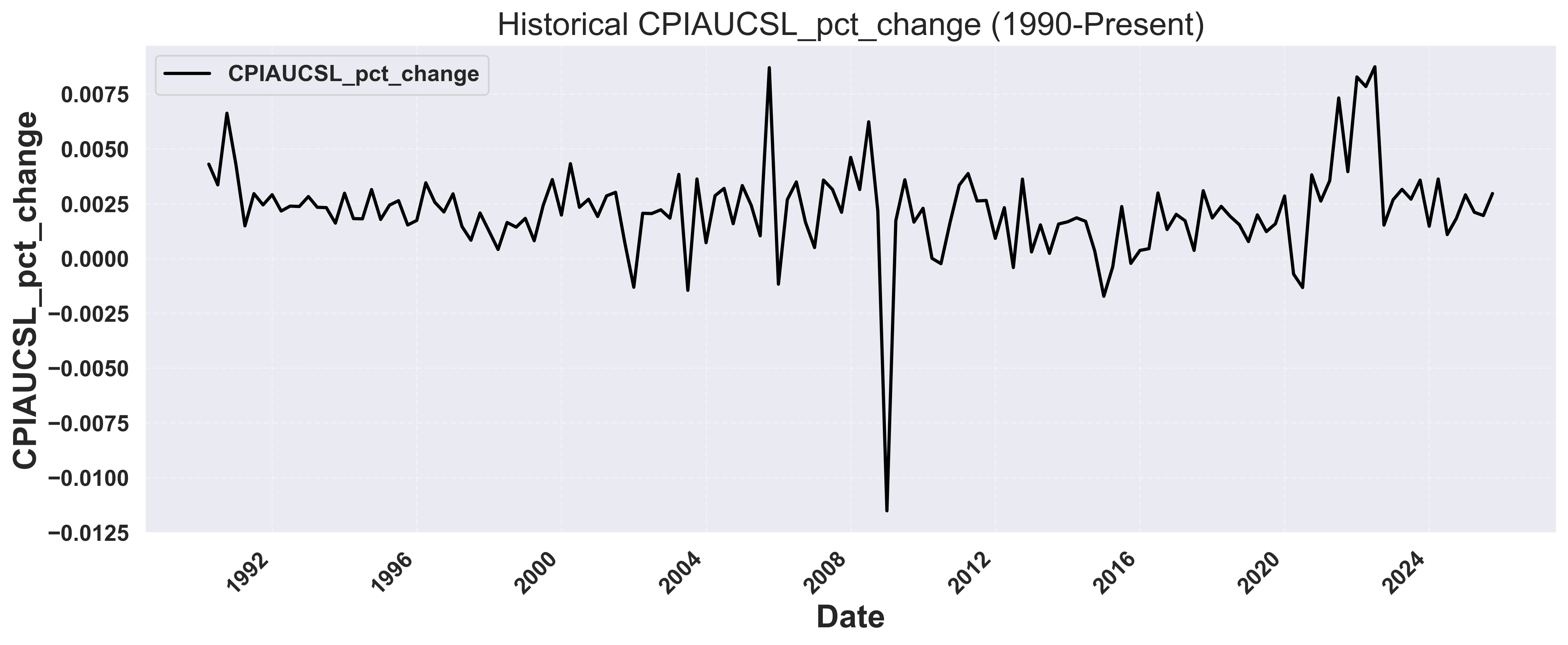
.resample("QE").mean() to align with GDP reporting cycles and reduce noise. Each row represents one quarter with percent changes for all economic indicators.4. Visualize Historical Data
Let’s visualize the historical CPI percent change over time:Show plotting code for raw time series
Show plotting code for raw time series
def plot_raw_time_series(df, output_dir="usecases/economic_backtesting"):
    """
    Plot raw time series data for the target variable.

    Args:
        df: DataFrame with date index and target column
        output_dir: Directory to save the plot
    """
    os.makedirs(output_dir, exist_ok=True)

    fig, ax = plt.subplots(figsize=(14, 6))

    # Plot the target column
    ax.plot(
        df.index,
        df["CPIAUCSL_pct_change"],
        color="black",
        linewidth=2,
        label="CPI % Change",
        zorder=2,
    )

    # Set labels and title
    ax.set_xlabel("Date")
    ax.set_ylabel("CPI % Change")
    ax.set_title("Historical CPI Percent Change (1990-Present, Quarterly)")

    # Add grid and legend
    ax.grid(True, linestyle="--", alpha=0.3)
    ax.legend(loc="upper left", frameon=True)

    # Format x-axis
    plt.xticks(rotation=45, ha="right")
    plt.tight_layout()

    # Save plot
    plot_path = os.path.join(output_dir, "raw_time_series.png")
    plt.savefig(plot_path, dpi=300, bbox_inches="tight")
    print(f"Raw time series plot saved to: {plot_path}")
    plt.close()

# Plot the raw data
plot_raw_time_series(df)
Example Output: Historical CPI Data
5. Run Backtesting Scenarios
Now let’s run three forecasting scenarios to compare performance:- Univariate: Forecast using only CPI history
- Multivariate (No Leak): Add other economic indicators as context
- Multivariate (With Future Leak): Include future variables (e.g., Fed Funds Rate)
Show backtesting code
Show backtesting code
# Configuration
TARGET_COLUMN = "CPIAUCSL_pct_change"
METADATA_COLUMNS = [
    "FEDFUNDS_pct_change",
    "GDPH_pct_change",
    "UNRATE_pct_change",
    "SPY_pct_change",
]
FORECAST_WINDOW = 1  # Forecast 1 quarter ahead
NUM_BACKTEST_ROWS = 12  # Backtest last 12 quarters (3 years)


def calculate_metrics(actual, predicted):
    """Calculate forecast accuracy metrics using scikit-learn."""
    mae = mean_absolute_error(actual, predicted)
    rmse = np.sqrt(mean_squared_error(actual, predicted))
    mape = mean_absolute_percentage_error(actual, predicted) * 100

    return {"MAE": mae, "RMSE": rmse, "MAPE": mape}


def extract_actuals_and_predictions(response, request, df_with_date):
    """Extract actual and predicted values from forecast response."""
    all_actuals = []
    all_predictions = []

    for forecast_row, sample in zip(response.forecasts, request.samples):
        if forecast_row[0].values:
            target_dates = pd.to_datetime(forecast_row[0].timestamps)
            predictions = forecast_row[0].values

            actuals = []
            for date in target_dates:
                actual_val = df_with_date[df_with_date["date"] == date][
                    TARGET_COLUMN
                ].values
                if len(actual_val) > 0:
                    actuals.append(actual_val[0])

            if len(actuals) == len(predictions):
                all_actuals.extend(actuals)
                all_predictions.extend(predictions)

    return all_actuals, all_predictions


async def run_backtest(df, metadata_cols=None, leak_cols=None):
    """
    Generic backtesting function for target column forecasting.

    Args:
        df: Combined economic dataset
        metadata_cols: List of metadata columns to use (None for univariate)
        leak_cols: List of columns to leak (None for no leak)

    Returns:
        tuple: (metrics, response)
    """
    # Prepare data
    if metadata_cols is None:
        # Univariate: only target column
        data_df = df.reset_index()[["date", TARGET_COLUMN]].copy()
        metadata_cols = []
    else:
        # Multivariate: target column + other indicators
        data_df = df.reset_index().copy()

    # Create backtesting request
    request = ForecastV2Request.from_dfs_pre_split(
        dfs=[data_df],
        timestamp_col="date",
        target_cols=[TARGET_COLUMN],
        model="Migas-1.0",
        num_target_rows=NUM_BACKTEST_ROWS,
        forecast_window=FORECAST_WINDOW,
        stride=FORECAST_WINDOW,
        metadata_cols=metadata_cols,
        leak_cols=leak_cols or [],
    )

    # Make forecast
    async with SynthefyAsyncAPIClient() as client:
        response = await client.forecast(request)

    # Calculate metrics
    all_actuals, all_predictions = extract_actuals_and_predictions(
        response, request, data_df
    )
    metrics = calculate_metrics(all_actuals, all_predictions)

    return metrics, response


async def run_all_backtests():
    """Run all three backtesting scenarios and compare results."""
    df = create_combined_dataset()

    # Run three scenarios in parallel
    results = await asyncio.gather(
        run_backtest(df, metadata_cols=None, leak_cols=None),
        run_backtest(df, metadata_cols=METADATA_COLUMNS, leak_cols=None),
        run_backtest(df, metadata_cols=METADATA_COLUMNS, leak_cols=METADATA_COLUMNS),
    )

    metrics1, response1 = results[0]
    metrics2, response2 = results[1]
    metrics3, response3 = results[2]

    return df, (metrics1, metrics2, metrics3), (response1, response2, response3)

# Run backtests
df, metrics_list, responses = asyncio.run(run_all_backtests())
metrics1, metrics2, metrics3 = metrics_list
6. Compare Results
Let’s print the comparison of all three scenarios:def print_comparison_summary(metrics1, metrics2, metrics3):
"""Print formatted comparison table of all three scenarios."""
print(f"\n{'Scenario':<45} {'MAE':>10} {'RMSE':>10} {'MAPE':>10}")
print("-" * 80)
scenarios = [
("1. Univariate (target only)", metrics1),
("2. Multivariate (No Leak)", metrics2),
("3. Multivariate (With Leak)", metrics3),
]
for name, m in scenarios:
print(
f"{name:<45} {m['MAE']:>10.6f} {m['RMSE']:>10.6f} {m['MAPE']:>9.2f}%"
)
print_comparison_summary(metrics1, metrics2, metrics3)
Scenario                                             MAE       RMSE       MAPE
--------------------------------------------------------------------------------
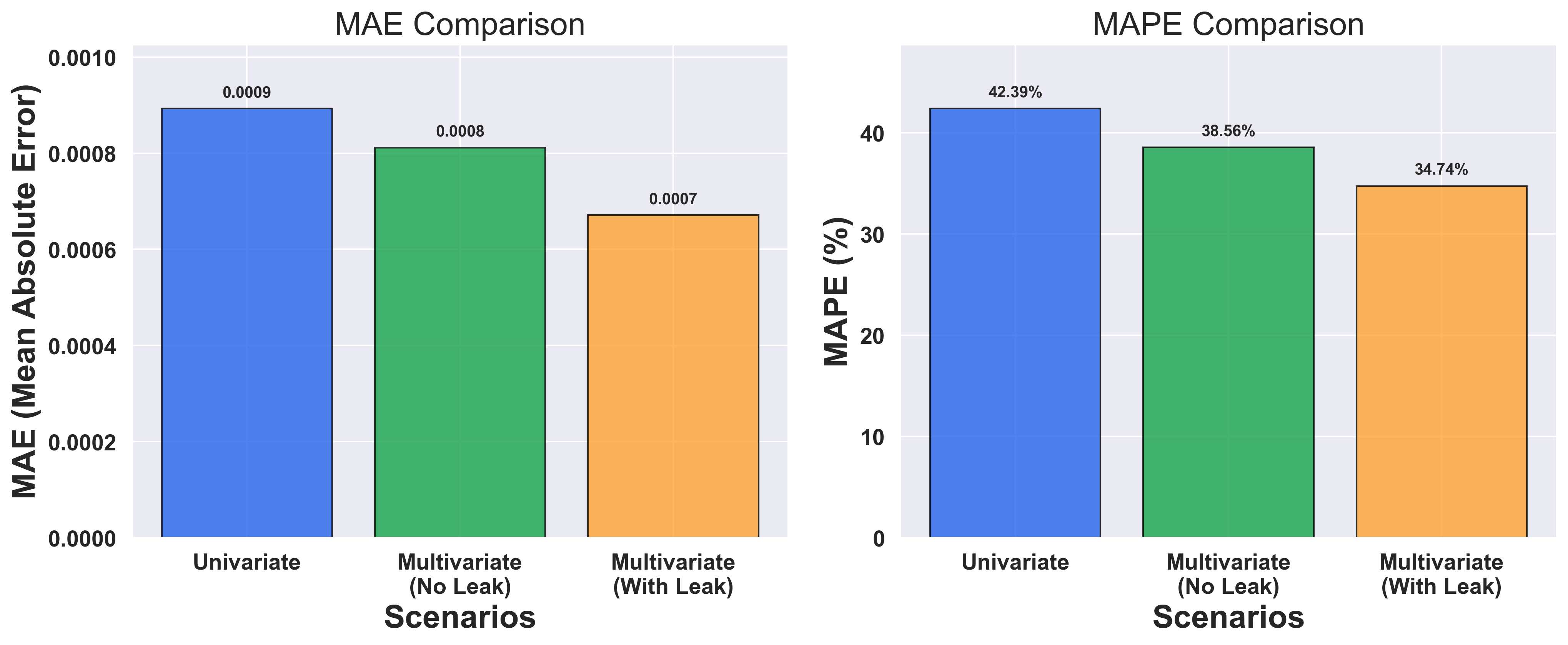
1. Univariate (target only)                     0.000893   0.001020     42.39%
2. Multivariate (No Leak)                       0.000812   0.000941     38.56%
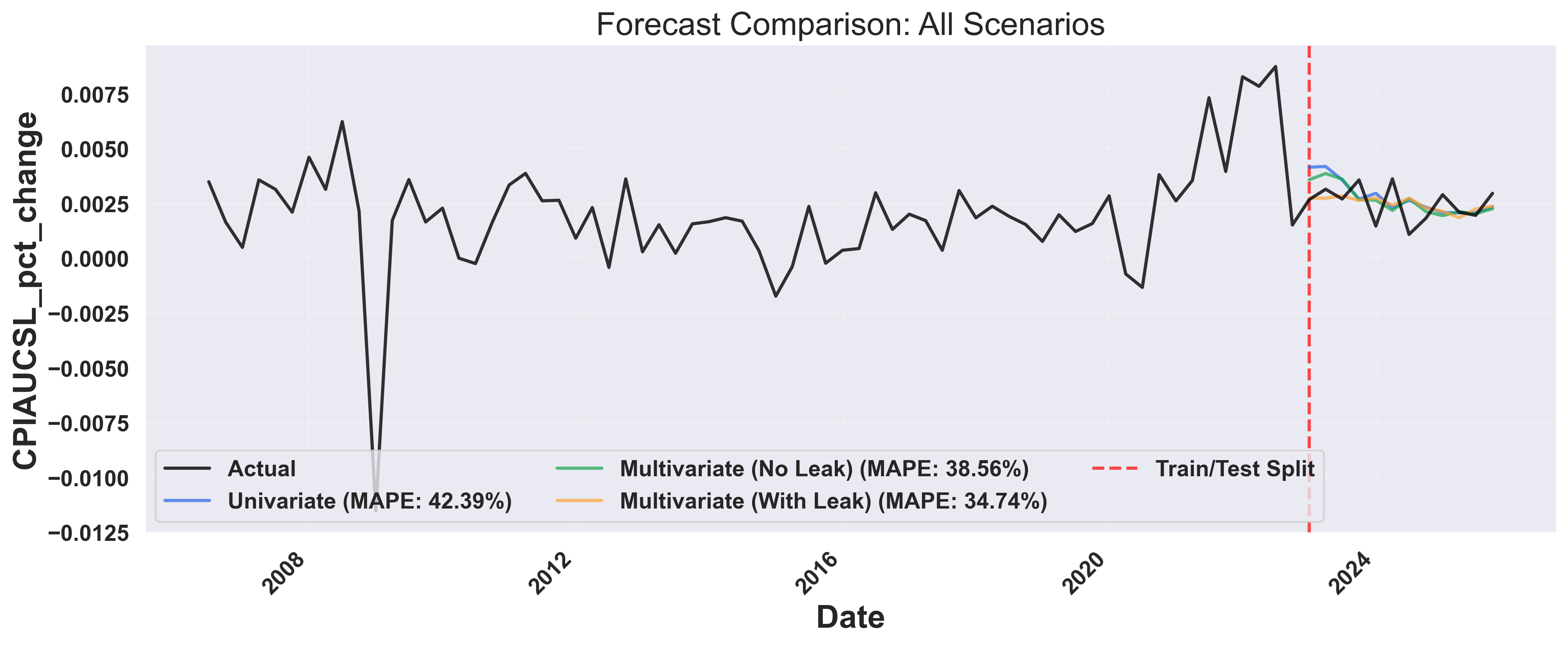
3. Multivariate (With Leak)                     0.000671   0.000825     34.74%
7. Visualize Forecast Comparison
Create a comprehensive visualization showing all forecast scenarios:Show forecast comparison plotting code
Show forecast comparison plotting code
def plot_forecast_comparison(df, responses, metrics_list, output_dir="economic_backtesting"):
    """
    Plot comparison of all three forecasting scenarios.

    Args:
        df: Combined economic dataset with date index
        responses: Tuple of (response1, response2, response3)
        metrics_list: List of (metrics1, metrics2, metrics3)
        output_dir: Directory to save the plot
    """
    os.makedirs(output_dir, exist_ok=True)

    response1, response2, response3 = responses
    metrics1, metrics2, metrics3 = metrics_list

    # Prepare data
    data_df = df.reset_index()[["date", TARGET_COLUMN]].copy()

    # Find the earliest forecast date to determine train/test split
    earliest_forecast_date = None
    for forecast_row in response1.forecasts:
        if forecast_row[0].values:
            dates = pd.to_datetime(forecast_row[0].timestamps)
            if earliest_forecast_date is None or dates.min() < earliest_forecast_date:
                earliest_forecast_date = dates.min()

    # Calculate cutoff to show last 50% of historical data before forecasts
    historical_before_forecast = data_df[data_df["date"] < earliest_forecast_date]
    cutoff_idx = int(len(historical_before_forecast) * 0.5)  # Show last 50% of history
    cutoff_date = historical_before_forecast.iloc[cutoff_idx]["date"]

    # Filter to show last 50% of historical data + all forecasts
    data_df_filtered = data_df[data_df["date"] >= cutoff_date].copy()

    fig, ax = plt.subplots(figsize=(14, 6))

    # Plot ground truth (last 50% of history)
    ax.plot(
        data_df_filtered["date"],
        data_df_filtered[TARGET_COLUMN],
        color=COLORS["groundtruth"],
        linewidth=2,
        label="Actual",
        zorder=4,
        alpha=0.8,
    )

    # Extract and plot forecasts for each scenario
    scenarios = [
        (response1, metrics1, "univariate", "Univariate"),
        (response2, metrics2, "multivariate", "Multivariate (No Leak)"),
        (response3, metrics3, "multivariate_leak", "Multivariate (With Leak)"),
    ]

    for response, metrics, color_key, label in scenarios:
        # Collect all forecast points across all windows
        all_forecast_dates = []
        all_forecast_values = []

        for forecast_row in response.forecasts:
            if forecast_row[0].values:
                dates = pd.to_datetime(forecast_row[0].timestamps)
                predictions = forecast_row[0].values

                all_forecast_dates.extend(dates)
                all_forecast_values.extend(predictions)

        # Combine all forecasts into a single DataFrame
        if all_forecast_dates:
            combined_forecast_df = pd.DataFrame(
                {"date": all_forecast_dates, "forecast": all_forecast_values}
            )

            # Remove duplicates by taking the mean if same date appears multiple times
            combined_forecast_df = (
                combined_forecast_df.groupby("date").mean().reset_index()
            )
            combined_forecast_df = combined_forecast_df.sort_values("date")

            # Plot as a single continuous line
            ax.plot(
                combined_forecast_df["date"],
                combined_forecast_df["forecast"],
                color=COLORS[color_key],
                linewidth=2,
                alpha=0.7,
                label=f"{label} (MAPE: {metrics['MAPE']:.2f}%)",
                zorder=3,
            )

    # Add vertical line at the train/test split (where forecasts begin)
    ax.axvline(
        x=earliest_forecast_date,
        color="red",
        linestyle="--",
        linewidth=2,
        alpha=0.7,
        label="Train/Test Split",
        zorder=2,
    )

    # Set labels and title
    ax.set_xlabel("Date")
    ax.set_ylabel(f"{TARGET_COLUMN}")
    ax.set_title("Forecast Comparison: All Scenarios")

    # Add grid and legend
    ax.grid(True, linestyle="--", alpha=0.3)
    # Place legend inside plot area at lower left with 2 rows
    ax.legend(loc="lower left", frameon=True, ncol=3)

    # Format x-axis
    plt.xticks(rotation=45, ha="right")
    plt.tight_layout()

    # Save plot
    plot_path = os.path.join(output_dir, "forecast_comparison.png")
    plt.savefig(plot_path, dpi=300, bbox_inches="tight")
    print(f"Forecast comparison plot saved to: {plot_path}")
    plt.close()

# Generate the plot
plot_forecast_comparison(df, responses, metrics_list)
Example Output: Forecast Comparison
8. Metrics Comparison
Finally, let’s create a bar chart comparing the performance metrics:Show metrics comparison plotting code
Show metrics comparison plotting code
def plot_metrics_comparison(metrics_list, output_dir="usecases/economic_backtesting"):
    """
    Plot bar chart comparing metrics across scenarios.

    Args:
        metrics_list: Tuple of (metrics1, metrics2, metrics3)
        output_dir: Directory to save the plot
    """
    os.makedirs(output_dir, exist_ok=True)

    metrics1, metrics2, metrics3 = metrics_list

    scenarios = [
        "Univariate",
        "Multivariate\n(No Leak)",
        "Multivariate\n(With Leak)",
    ]
    mae_values = [metrics1["MAE"], metrics2["MAE"], metrics3["MAE"]]
    mape_values = [metrics1["MAPE"], metrics2["MAPE"], metrics3["MAPE"]]

    fig, (ax1, ax2) = plt.subplots(1, 2, figsize=(14, 6))

    x = np.arange(len(scenarios))
    bar_colors = ["#2563eb", "#16a34a", "#fea333"]

    # MAE plot
    bars1 = ax1.bar(
        x,
        mae_values,
        color=bar_colors,
        alpha=0.8,
        edgecolor="black",
        linewidth=1,
    )
    for i, (bar, val) in enumerate(zip(bars1, mae_values)):
        ax1.text(
            bar.get_x() + bar.get_width() / 2,
            bar.get_height() + max(mae_values) * 0.02,
            f"{val:.4f}",
            ha="center",
            va="bottom",
            fontsize=10,
        )

    ax1.set_xlabel("Scenarios")
    ax1.set_ylabel("MAE (Mean Absolute Error)")
    ax1.set_title("MAE Comparison")
    ax1.set_xticks(x)
    ax1.set_xticklabels(scenarios)
    ax1.set_ylim(0, max(mae_values) * 1.15)

    # MAPE plot
    bars2 = ax2.bar(
        x,
        mape_values,
        color=bar_colors,
        alpha=0.8,
        edgecolor="black",
        linewidth=1,
    )
    for i, (bar, val) in enumerate(zip(bars2, mape_values)):
        ax2.text(
            bar.get_x() + bar.get_width() / 2,
            bar.get_height() + max(mape_values) * 0.02,
            f"{val:.2f}%",
            ha="center",
            va="bottom",
            fontsize=10,
        )

    ax2.set_xlabel("Scenarios")
    ax2.set_ylabel("MAPE (%)")
    ax2.set_title("MAPE Comparison")
    ax2.set_xticks(x)
    ax2.set_xticklabels(scenarios)
    ax2.set_ylim(0, max(mape_values) * 1.15)

    plt.tight_layout()

    # Save plot
    plot_path = os.path.join(output_dir, "metrics_comparison.png")
    plt.savefig(plot_path, dpi=300, bbox_inches="tight")
    print(f"Metrics comparison plot saved to: {plot_path}")
    plt.close()

# Generate the plot
plot_metrics_comparison(metrics_list)
Example Output: Metrics Comparison
Key Insights
From this analysis, you can answer critical questions:- How much does context help? → Compare MAPE across scenarios to quantify improvement
- What If Forecasting Variables known in advance (like Fed Funds Rate) can be included as leak columns
Complete Code
Here’s the full working example you can run:Show complete code
Show complete code
import asyncio
import os

import matplotlib.pyplot as plt
import numpy as np
import pandas as pd
from fredapi import Fred
from haver import Haver
from sklearn.metrics import (
    mean_absolute_error,
    mean_absolute_percentage_error,
    mean_squared_error,
)
df["date"] = pd.to_datetime(df["date"])
return df


def get_unemployment_rate():
"""Retrieve Unemployment Rate from FRED."""
df = (
    fred.get_series("UNRATE", observation_start="1990-01-01")
    .reset_index()
    .rename(columns={"index": "date", 0: "UNRATE"})
)
df["date"] = pd.to_datetime(df["date"])
return df


def get_consumer_price_index():
"""Retrieve Consumer Price Index from FRED."""
df = (
    fred.get_series("CPIAUCSL", observation_start="1990-01-01")
    .reset_index()
    .rename(columns={"index": "date", 0: "CPIAUCSL"})
)
df["date"] = pd.to_datetime(df["date"])
return df


def get_sp500():
"""Retrieve S&P 500 Index from Haver."""
return get_haver_series("SP500@USECON", "SPY")


def create_combined_dataset():
"""Combine economic indicators into a single quarterly dataset."""
# Fetch all data sources
gdp_df = get_haver_gdp()
fed_funds = get_federal_funds_rate()
unemployment = get_unemployment_rate()
cpi = get_consumer_price_index()
sp500 = get_sp500()

# Merge monthly indicators
macro_df = (
    fed_funds.merge(unemployment, on="date", how="outer")
    .merge(cpi, on="date", how="outer")
    .merge(sp500, on="date", how="outer")
)
macro_df["date"] = pd.to_datetime(macro_df["date"])
macro_df = macro_df.set_index("date")

# Join with GDP and forward-fill
gdp_df["date"] = pd.to_datetime(gdp_df["date"])
gdp_indexed = gdp_df.set_index("date")[["GDPH_pct_change"]]
combined_df = gdp_indexed.join(macro_df, how="outer")
combined_df["GDPH_pct_change"] = combined_df["GDPH_pct_change"].ffill()

# Calculate percent changes
for col in ["FEDFUNDS", "UNRATE", "CPIAUCSL", "SPY"]:
    combined_df[f"{col}_pct_change"] = combined_df[col].pct_change()

# Filter and resample to quarterly
combined_df = combined_df[combined_df.index >= "1990-01-01"]
combined_df = combined_df.filter(like="_pct_change").ffill().dropna()
combined_df = combined_df.resample("QE").mean()

return combined_df


def plot_raw_time_series(df, output_dir="economic_backtesting"):
"""Plot raw time series data."""
os.makedirs(output_dir, exist_ok=True)

fig, ax = plt.subplots(figsize=(14, 6))

ax.plot(
    df.index,
    df[TARGET_COLUMN],
    color=COLORS["groundtruth"],
    linewidth=2,
    label=f"{TARGET_COLUMN}",
    zorder=2,
)

ax.set_xlabel("Date")
ax.set_ylabel(f"{TARGET_COLUMN}")
ax.set_title(f"Historical {TARGET_COLUMN} (1990-Present)")
ax.grid(True, linestyle="--", alpha=0.3)
ax.legend(loc="upper left", frameon=True)

plt.xticks(rotation=45, ha="right")
plt.tight_layout()

plot_path = os.path.join(output_dir, "raw_time_series.png")
plt.savefig(plot_path, dpi=300, bbox_inches="tight")
print(f"Raw time series plot saved to: {plot_path}")
plt.close()


def calculate_metrics(actual, predicted):
"""Calculate forecast accuracy metrics."""
mae = mean_absolute_error(actual, predicted)
rmse = np.sqrt(mean_squared_error(actual, predicted))
mape = mean_absolute_percentage_error(actual, predicted) * 100

return {"MAE": mae, "RMSE": rmse, "MAPE": mape}


def extract_actuals_and_predictions(response, request, df_with_date):
"""Extract actual and predicted values from forecast response."""
all_actuals = []
all_predictions = []

for forecast_row, sample in zip(response.forecasts, request.samples):
    if forecast_row[0].values:
        target_dates = pd.to_datetime(forecast_row[0].timestamps)
        predictions = forecast_row[0].values

        actuals = []
        for date in target_dates:
            actual_val = df_with_date[df_with_date["date"] == date][
                TARGET_COLUMN
            ].values
            if len(actual_val) > 0:
                actuals.append(actual_val[0])

        if len(actuals) == len(predictions):
            all_actuals.extend(actuals)
            all_predictions.extend(predictions)

return all_actuals, all_predictions


def plot_forecast_comparison(
df, responses, metrics_list, output_dir="economic_backtesting"
):
"""Plot comparison of all three forecasting scenarios."""
os.makedirs(output_dir, exist_ok=True)

response1, response2, response3 = responses
metrics1, metrics2, metrics3 = metrics_list

data_df = df.reset_index()[["date", TARGET_COLUMN]].copy()

# Find the earliest forecast date to determine train/test split
earliest_forecast_date = None
for forecast_row in response1.forecasts:
    if forecast_row[0].values:
        dates = pd.to_datetime(forecast_row[0].timestamps)
        if earliest_forecast_date is None or dates.min() < earliest_forecast_date:
            earliest_forecast_date = dates.min()

# Calculate cutoff to show last 50% of historical data before forecasts
historical_before_forecast = data_df[data_df["date"] < earliest_forecast_date]
cutoff_idx = int(len(historical_before_forecast) * 0.5)
cutoff_date = historical_before_forecast.iloc[cutoff_idx]["date"]

# Filter to show last 50% of historical data + all forecasts
data_df_filtered = data_df[data_df["date"] >= cutoff_date].copy()

fig, ax = plt.subplots(figsize=(14, 6))

# Plot ground truth
ax.plot(
    data_df_filtered["date"],
    data_df_filtered[TARGET_COLUMN],
    color=COLORS["groundtruth"],
    linewidth=2,
    label="Actual",
    zorder=4,
    alpha=0.8,
)

# Plot forecasts for each scenario
scenarios = [
    (response1, metrics1, "univariate", "Univariate"),
    (response2, metrics2, "multivariate", "Multivariate (No Leak)"),
    (response3, metrics3, "multivariate_leak", "Multivariate (With Leak)"),
]
FORECAST_WINDOW = 1  # Forecast 1 quarter ahead
NUM_BACKTEST_ROWS = 12  # Backtest last 12 quarters (3 years)

# Initialize Haver and FRED
haver = Haver(api_key=HAVER_API_KEY)
fred = Fred(api_key=FRED_API_KEY)

# Plot colors
COLORS = {
    "univariate": "#2563eb",
    "multivariate": "#16a34a",
    "multivariate_leak": "#fea333",
    "groundtruth": "black",
}


def get_haver_series(haver_code, column_name):
    """Retrieve data from Haver and calculate percent change."""
    df = haver.read_df(haver_codes=[haver_code])
    df = df[df.columns[df.columns.isin(["date", "value"])]]
    df = df.dropna()
    df = df.rename(columns={"value": column_name})

    df["date"] = pd.to_datetime(df["date"])
    pct_change_column = f"{column_name}_pct_change"
    df[pct_change_column] = df[column_name].pct_change().dropna()

    return df


def get_haver_gdp():
    """Retrieve Real GDP from Haver."""
    return get_haver_series("GDPHA@USECON", "GDPH")


def get_federal_funds_rate():
    """Retrieve Federal Funds Effective Rate from FRED."""
    df = (
        fred.get_series("FEDFUNDS", observation_start="1990-01-01")
        .reset_index()
        .rename(columns={"index": "date", 0: "FEDFUNDS"})
    )
    df["date"] = pd.to_datetime(df["date"])
    return df


def get_unemployment_rate():
    """Retrieve Unemployment Rate from FRED."""
    df = (
        fred.get_series("UNRATE", observation_start="1990-01-01")
        .reset_index()
        .rename(columns={"index": "date", 0: "UNRATE"})
    )
    df["date"] = pd.to_datetime(df["date"])
    return df


def get_consumer_price_index():
    """Retrieve Consumer Price Index from FRED."""
    df = (
        fred.get_series("CPIAUCSL", observation_start="1990-01-01")
        .reset_index()
        .rename(columns={"index": "date", 0: "CPIAUCSL"})
    )
    df["date"] = pd.to_datetime(df["date"])
    return df


def get_sp500():
    """Retrieve S&P 500 Index from Haver."""
    return get_haver_series("SP500@USECON", "SPY")


def create_combined_dataset():
    """Combine economic indicators into a single quarterly dataset."""
    # Fetch all data sources
    gdp_df = get_haver_gdp()
    fed_funds = get_federal_funds_rate()
    unemployment = get_unemployment_rate()
    cpi = get_consumer_price_index()
    sp500 = get_sp500()

    # Merge monthly indicators
    macro_df = (
        fed_funds.merge(unemployment, on="date", how="outer")
        .merge(cpi, on="date", how="outer")
        .merge(sp500, on="date", how="outer")
    )
    macro_df["date"] = pd.to_datetime(macro_df["date"])
    macro_df = macro_df.set_index("date")

    # Join with GDP and forward-fill
    gdp_df["date"] = pd.to_datetime(gdp_df["date"])
    gdp_indexed = gdp_df.set_index("date")[["GDPH_pct_change"]]
    combined_df = gdp_indexed.join(macro_df, how="outer")
    combined_df["GDPH_pct_change"] = combined_df["GDPH_pct_change"].ffill()

    # Calculate percent changes
    for col in ["FEDFUNDS", "UNRATE", "CPIAUCSL", "SPY"]:
        combined_df[f"{col}_pct_change"] = combined_df[col].pct_change()

    # Filter and resample to quarterly
    combined_df = combined_df[combined_df.index >= "1990-01-01"]
    combined_df = combined_df.filter(like="_pct_change").ffill().dropna()
    combined_df = combined_df.resample("QE").mean()

    return combined_df


def plot_raw_time_series(df, output_dir="economic_backtesting"):
    """Plot raw time series data."""
    os.makedirs(output_dir, exist_ok=True)

    fig, ax = plt.subplots(figsize=(14, 6))

    ax.plot(
        df.index,
        df[TARGET_COLUMN],
        color=COLORS["groundtruth"],
        linewidth=2,
        label=f"{TARGET_COLUMN}",
        zorder=2,
    )

    ax.set_xlabel("Date")
    ax.set_ylabel(f"{TARGET_COLUMN}")
    ax.set_title(f"Historical {TARGET_COLUMN} (1990-Present)")
    ax.grid(True, linestyle="--", alpha=0.3)
    ax.legend(loc="upper left", frameon=True)

    plt.xticks(rotation=45, ha="right")
    plt.tight_layout()

    plot_path = os.path.join(output_dir, "raw_time_series.png")
    plt.savefig(plot_path, dpi=300, bbox_inches="tight")
    print(f"Raw time series plot saved to: {plot_path}")
    plt.close()


def calculate_metrics(actual, predicted):
    """Calculate forecast accuracy metrics."""
    mae = mean_absolute_error(actual, predicted)
    rmse = np.sqrt(mean_squared_error(actual, predicted))
    mape = mean_absolute_percentage_error(actual, predicted) * 100

    return {"MAE": mae, "RMSE": rmse, "MAPE": mape}


def extract_actuals_and_predictions(response, request, df_with_date):
    """Extract actual and predicted values from forecast response."""
    all_actuals = []
    all_predictions = []

    for forecast_row, sample in zip(response.forecasts, request.samples):
        if forecast_row[0].values:
            target_dates = pd.to_datetime(forecast_row[0].timestamps)
            predictions = forecast_row[0].values

            all_forecast_dates.extend(dates)
            all_forecast_values.extend(predictions)

    if all_forecast_dates:
        combined_forecast_df = pd.DataFrame(
            {"date": all_forecast_dates, "forecast": all_forecast_values}
        )

        combined_forecast_df = (
            combined_forecast_df.groupby("date").mean().reset_index()
        )
        combined_forecast_df = combined_forecast_df.sort_values("date")

        ax.plot(
            combined_forecast_df["date"],
            combined_forecast_df["forecast"],
            color=COLORS[color_key],
            linewidth=2,
            alpha=0.7,
            label=f"{label} (MAPE: {metrics['MAPE']:.2f}%)",
            zorder=3,
        )

# Add vertical line at the train/test split
ax.axvline(
    x=earliest_forecast_date,
    color="red",
    linestyle="--",
    linewidth=2,
    alpha=0.7,
    label="Train/Test Split",
    zorder=2,
)

ax.set_xlabel("Date")
ax.set_ylabel(f"{TARGET_COLUMN}")
ax.set_title("Forecast Comparison: All Scenarios")

ax.grid(True, linestyle="--", alpha=0.3)
ax.legend(loc="lower left", frameon=True, ncol=3)

plt.xticks(rotation=45, ha="right")
plt.tight_layout()

plot_path = os.path.join(output_dir, "forecast_comparison.png")
plt.savefig(plot_path, dpi=300, bbox_inches="tight")
print(f"Forecast comparison plot saved to: {plot_path}")
plt.close()


def plot_metrics_comparison(
metrics_list, output_dir="economic_backtesting"
):
"""Plot bar chart comparing metrics across scenarios."""
os.makedirs(output_dir, exist_ok=True)

metrics1, metrics2, metrics3 = metrics_list

scenarios = [
    "Univariate",
    "Multivariate\n(No Leak)",
    "Multivariate\n(With Leak)",
]
mae_values = [metrics1["MAE"], metrics2["MAE"], metrics3["MAE"]]
mape_values = [metrics1["MAPE"], metrics2["MAPE"], metrics3["MAPE"]]

fig, (ax1, ax2) = plt.subplots(1, 2, figsize=(14, 6))

x = np.arange(len(scenarios))
bar_colors = [
    COLORS["univariate"],
    COLORS["multivariate"],
    COLORS["multivariate_leak"],
]

# MAE plot
bars1 = ax1.bar(
    x, mae_values, color=bar_colors, alpha=0.8, edgecolor="black", linewidth=1
)
for i, (bar, val) in enumerate(zip(bars1, mae_values)):
    ax1.text(
        bar.get_x() + bar.get_width() / 2,
        bar.get_height() + max(mae_values) * 0.02,
        f"{val:.4f}",
        ha="center",
        va="bottom",
        fontsize=10,
    )

ax1.set_xlabel("Scenarios")
ax1.set_ylabel("MAE (Mean Absolute Error)")
ax1.set_title("MAE Comparison")
ax1.set_xticks(x)
ax1.set_xticklabels(scenarios)
ax1.set_ylim(0, max(mae_values) * 1.15)

# MAPE plot
bars2 = ax2.bar(
    x, mape_values, color=bar_colors, alpha=0.8, edgecolor="black", linewidth=1
)
for i, (bar, val) in enumerate(zip(bars2, mape_values)):
    ax2.text(
        bar.get_x() + bar.get_width() / 2,
        bar.get_height() + max(mape_values) * 0.02,
        f"{val:.2f}%",
        ha="center",
        va="bottom",
        fontsize=10,
    )

ax2.set_xlabel("Scenarios")
ax2.set_ylabel("MAPE (%)")
ax2.set_title("MAPE Comparison")
ax2.set_xticks(x)
ax2.set_xticklabels(scenarios)
ax2.set_ylim(0, max(mape_values) * 1.15)

plt.tight_layout()

plot_path = os.path.join(output_dir, "metrics_comparison.png")
plt.savefig(plot_path, dpi=300, bbox_inches="tight")
print(f"Metrics comparison plot saved to: {plot_path}")
plt.close()


async def run_backtest(df, metadata_cols=None, leak_cols=None):
"""Generic backtesting function for target column forecasting."""
if metadata_cols is None:
    data_df = df.reset_index()[["date", TARGET_COLUMN]].copy()

    # Show only last 10% of data
    total_rows = len(data_df)
    cutoff_idx = int(total_rows * 0.9)
    cutoff_date = data_df.iloc[cutoff_idx]["date"]
    data_df_filtered = data_df[data_df["date"] >= cutoff_date].copy()

    fig, ax = plt.subplots(figsize=(14, 6))

    # Plot ground truth
    ax.plot(
        data_df_filtered["date"],
        data_df_filtered[TARGET_COLUMN],
        color=COLORS["groundtruth"],
        linewidth=2,
        label="Actual",
        zorder=4,
        alpha=0.8,
    )

    # Plot forecasts for each scenario
    scenarios = [
        (response1, metrics1, "univariate", "Univariate"),
        (response2, metrics2, "multivariate", "Multivariate (No Leak)"),
        (response3, metrics3, "multivariate_leak", "Multivariate (With Leak)"),
    ]

    for response, metrics, color_key, label in scenarios:
        all_forecast_dates = []
        all_forecast_values = []

        for forecast_row in response.forecasts:
            if forecast_row[0].values:
                dates = pd.to_datetime(forecast_row[0].timestamps)
                predictions = forecast_row[0].values

                all_forecast_dates.extend(dates)
                all_forecast_values.extend(predictions)

        if all_forecast_dates:
            combined_forecast_df = pd.DataFrame(
                {"date": all_forecast_dates, "forecast": all_forecast_values}
            )

            combined_forecast_df = (
                combined_forecast_df.groupby("date").mean().reset_index()
            )
            combined_forecast_df = combined_forecast_df.sort_values("date")

            ax.plot(
                combined_forecast_df["date"],
                combined_forecast_df["forecast"],
                color=COLORS[color_key],
                linewidth=2,
                alpha=0.7,
                label=f"{label} (MAPE: {metrics['MAPE']:.2f}%)",
                zorder=3,
            )

    ax.set_xlabel("Date")
    ax.set_ylabel(f"{TARGET_COLUMN}")
    ax.set_title(
        "Forecast Comparison: All Scenarios (Last 10% of History + Forecasts)"
    )

    ax.grid(True, linestyle="--", alpha=0.3)
    ax.legend(loc="upper left", frameon=True)

    plt.xticks(rotation=45, ha="right")
    plt.tight_layout()

    plot_path = os.path.join(output_dir, "forecast_comparison.png")
    plt.savefig(plot_path, dpi=300, bbox_inches="tight")
    print(f"Forecast comparison plot saved to: {plot_path}")
    plt.close()


def plot_metrics_comparison(
    metrics_list, output_dir="economic_backtesting"
):
    """Plot bar chart comparing metrics across scenarios."""
    os.makedirs(output_dir, exist_ok=True)

    metrics1, metrics2, metrics3 = metrics_list

    scenarios = [
        "Univariate",
        "Multivariate\n(No Leak)",
        "Multivariate\n(With Leak)",
    ]
    mae_values = [metrics1["MAE"], metrics2["MAE"], metrics3["MAE"]]
    mape_values = [metrics1["MAPE"], metrics2["MAPE"], metrics3["MAPE"]]

    fig, (ax1, ax2) = plt.subplots(1, 2, figsize=(14, 6))

    x = np.arange(len(scenarios))
    bar_colors = [
        COLORS["univariate"],
        COLORS["multivariate"],
        COLORS["multivariate_leak"],
    ]

    # MAE plot
    bars1 = ax1.bar(
        x, mae_values, color=bar_colors, alpha=0.8, edgecolor="black", linewidth=1
    )
    for i, (bar, val) in enumerate(zip(bars1, mae_values)):
        ax1.text(
            bar.get_x() + bar.get_width() / 2,
            bar.get_height() + max(mae_values) * 0.02,
            f"{val:.4f}",
            ha="center",
            va="bottom",
            fontsize=10,
        )

    ax1.set_xlabel("Scenarios")
    ax1.set_ylabel("MAE (Mean Absolute Error)")
    ax1.set_title("MAE Comparison")
    ax1.set_xticks(x)
    ax1.set_xticklabels(scenarios)
    ax1.set_ylim(0, max(mae_values) * 1.15)

    # MAPE plot
    bars2 = ax2.bar(
        x, mape_values, color=bar_colors, alpha=0.8, edgecolor="black", linewidth=1
    )
    for i, (bar, val) in enumerate(zip(bars2, mape_values)):
        ax2.text(
            bar.get_x() + bar.get_width() / 2,
            bar.get_height() + max(mape_values) * 0.02,
            f"{val:.2f}%",
            ha="center",
            va="bottom",
            fontsize=10,
        )

    ax2.set_xlabel("Scenarios")
    ax2.set_ylabel("MAPE (%)")
    ax2.set_title("MAPE Comparison")
    ax2.set_xticks(x)
    ax2.set_xticklabels(scenarios)
    ax2.set_ylim(0, max(mape_values) * 1.15)

    plt.tight_layout()

    plot_path = os.path.join(output_dir, "metrics_comparison.png")
    plt.savefig(plot_path, dpi=300, bbox_inches="tight")
    print(f"Metrics comparison plot saved to: {plot_path}")
    plt.close()


async def run_backtest(df, metadata_cols=None, leak_cols=None):
    """Generic backtesting function for target column forecasting."""
    if metadata_cols is None:
        data_df = df.reset_index()[["date", TARGET_COLUMN]].copy()
        metadata_cols = []
    else:
        data_df = df.reset_index().copy()

    request = ForecastV2Request.from_dfs_pre_split(
        dfs=[data_df],
        timestamp_col="date",
        target_cols=[TARGET_COLUMN],
        model="Migas-1.0",
        num_target_rows=NUM_BACKTEST_ROWS,
        forecast_window=FORECAST_WINDOW,
        stride=FORECAST_WINDOW,
        metadata_cols=metadata_cols,
        leak_cols=leak_cols or [],
    )

    async with SynthefyAsyncAPIClient() as client:
        response = await client.forecast(request)

    all_actuals, all_predictions = extract_actuals_and_predictions(
        response, request, data_df
    )
    metrics = calculate_metrics(all_actuals, all_predictions)

    return metrics, response


def print_comparison_summary(metrics1, metrics2, metrics3):
    """Print formatted comparison table."""
    print(f"\n{'Scenario':<45} {'MAE':>10} {'RMSE':>10} {'MAPE':>10}")
    print("-" * 80)

    scenarios = [
        ("1. Univariate (target only)", metrics1),
        ("2. Multivariate (No Leak)", metrics2),
        ("3. Multivariate (With Leak)", metrics3),
    ]

    for name, m in scenarios:
        print(
            f"{name:<45} {m['MAE']:>10.6f} {m['RMSE']:>10.6f} {m['MAPE']:>9.2f}%"
        )


async def run_all_backtests():
    """Run all three backtesting scenarios and compare results."""
    df = create_combined_dataset()

    plot_raw_time_series(df)

    results = await asyncio.gather(
        run_backtest(df, metadata_cols=None, leak_cols=None),
        run_backtest(df, metadata_cols=METADATA_COLUMNS, leak_cols=None),
        run_backtest(
            df, metadata_cols=METADATA_COLUMNS, leak_cols=METADATA_COLUMNS
        ),
    )

    metrics1, response1 = results[0]
    metrics2, response2 = results[1]
    metrics3, response3 = results[2]

    print_comparison_summary(metrics1, metrics2, metrics3)

    plot_forecast_comparison(
        df,
        (response1, response2, response3),
        (metrics1, metrics2, metrics3),
    )

    plot_metrics_comparison((metrics1, metrics2, metrics3))


def main():
    """Main function to run backtesting analysis."""
    return asyncio.run(run_all_backtests())


if __name__ == "__main__":
    results = main()
Next Steps
- Try different target variables: Forecast unemployment, S&P 500, or other economic indicators
- Adjust forecast horizon: Change
NUM_BACKTEST_ROWSto change the backtesting period - Add more economic data: Include additional indicators from FRED or Haver, or your own