> ## Documentation Index
> Fetch the complete documentation index at: https://docs.synthefy.com/llms.txt
> Use this file to discover all available pages before exploring further.
# InfluxDB
> Run Nori regression inside InfluxDB 3 as a Processing Engine plugin, with predictions written back to your database.
Nori runs inside InfluxDB 3 as a plugin. You tell it which column to predict and
which columns to predict it from, and it writes the results back into your
database as a new table.
## How InfluxDB runs it
InfluxDB 3 stores rows in tables, like any database, with one difference that
matters here: every row carries a timestamp, and a column can be empty on some
rows and filled on others. A sensor that stops reporting leaves its column empty
while the columns beside it keep filling.
InfluxDB 3 also has a **Processing Engine**, which runs Python inside the database
itself, either on a schedule or when you call an HTTP endpoint. Nori ships as one
of those plugins,
[`nori_regression`](https://github.com/influxdata/influxdb3_plugins/tree/main/influxdata/nori_regression),
published in InfluxData's plugin repository. There is no service to deploy next to
your database and no data to export.
## What a run does
Take a table of cooling-unit telemetry. Its coolant temperature probe stopped
reporting at 20:00, while motor current, vibration and inlet temperature kept
coming in:
| time | motor\_current | vibration | inlet\_temp | coolant\_temp |
| ----- | -------------- | --------- | ----------- | ------------- |
| 17:00 | 33.43 | 1.387 | 22.88 | 7.41 |
| 18:00 | 32.66 | 1.392 | 22.10 | 6.87 |
| 19:00 | 32.05 | 1.400 | 21.32 | 6.34 |
| 20:00 | 30.07 | 1.309 | 20.60 | |
| 21:00 | 29.96 | 1.325 | 19.99 | |
One run does three things:
1. Reads a window of rows from that table.
2. Takes the rows that **have** `coolant_temp` as its examples, and predicts the
rows that do not, from `motor_current`, `vibration` and `inlet_temp`.
3. Writes the predictions into a **new** table, `cooling_unit_regressed`:
| time | value | model | source | target |
| ----- | ----- | ------------------- | ------------- | ------------- |
| 20:00 | 5.63 | `synthefy/nori-30m` | cooling\_unit | coolant\_temp |
| 21:00 | 5.26 | `synthefy/nori-30m` | cooling\_unit | coolant\_temp |
Your original table is never modified, so a measured value and a predicted one
stay distinguishable. Query and chart `cooling_unit_regressed` like any other
table.
## Before you start
* **InfluxDB 3 Core or Enterprise**, version 3.8.2 or later, started with the
Processing Engine enabled (`influxdb3 serve --plugin-dir /path/to/plugins`).
* HTTPS egress from the InfluxDB host to the Nori gateway.
* Numeric feature columns. Encode categorical columns before calling.
## Set up
Create one from the [API key](/setup/api_key) page if you do not have one
already.
In InfluxDB 3 Explorer, open **Manage Plugins → Plugin Library** and search
for `nori`.
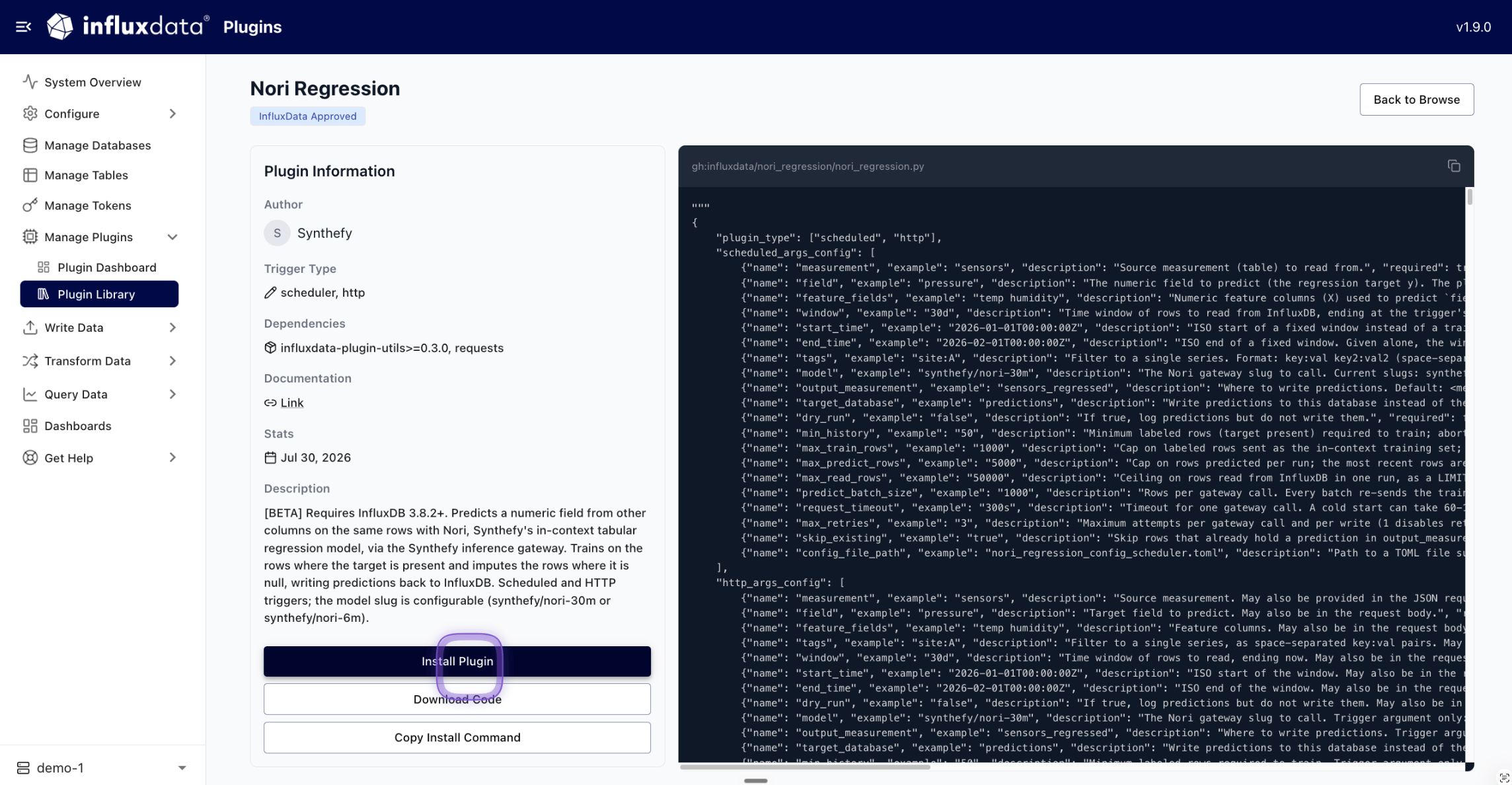
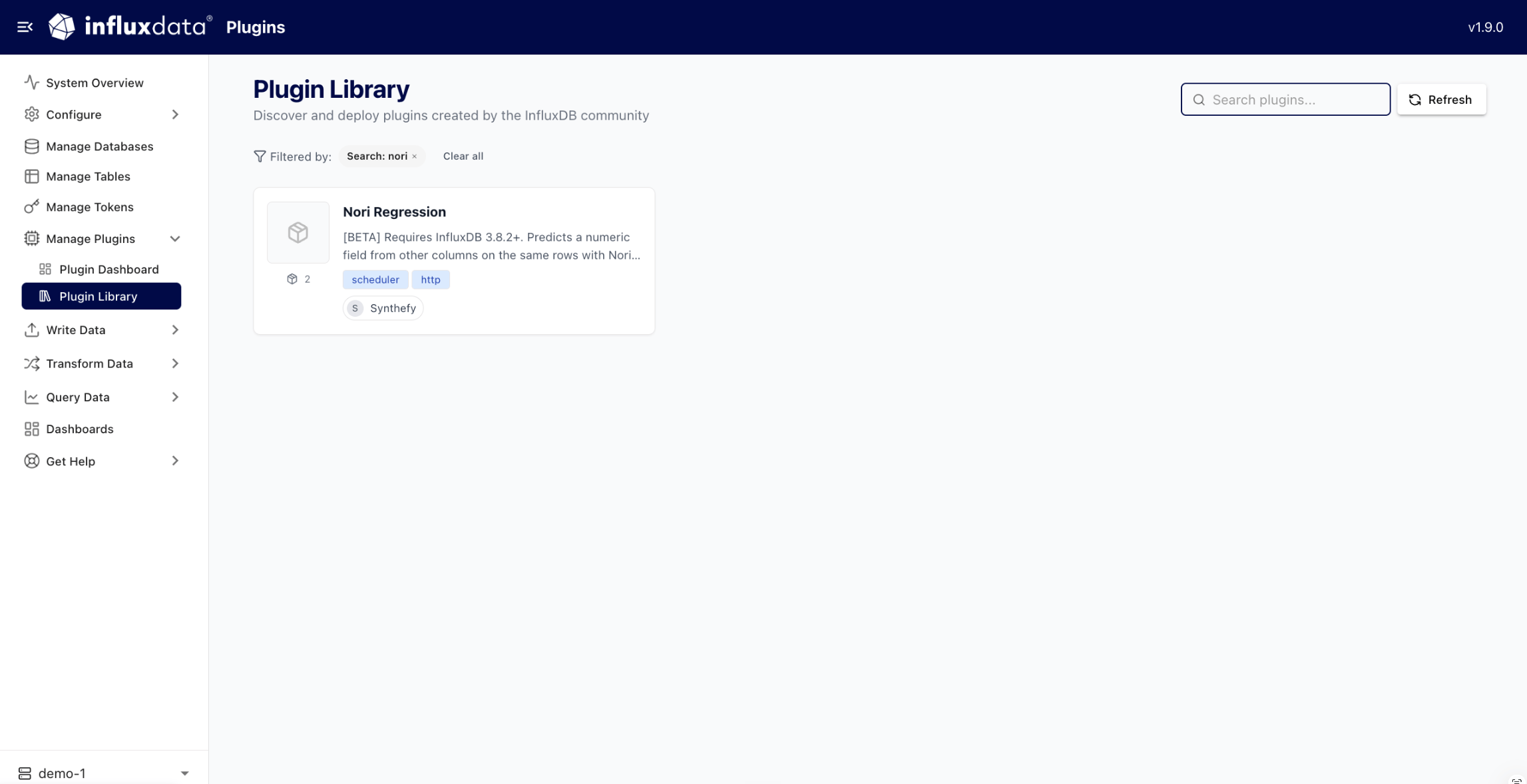 Open it and choose **Install Plugin**. Explorer installs the plugin and its
two Python dependencies for you.
Open it and choose **Install Plugin**. Explorer installs the plugin and its
two Python dependencies for you.
 From the CLI instead:
```bash theme={null}
influxdb3 install package influxdata-plugin-utils requests
```
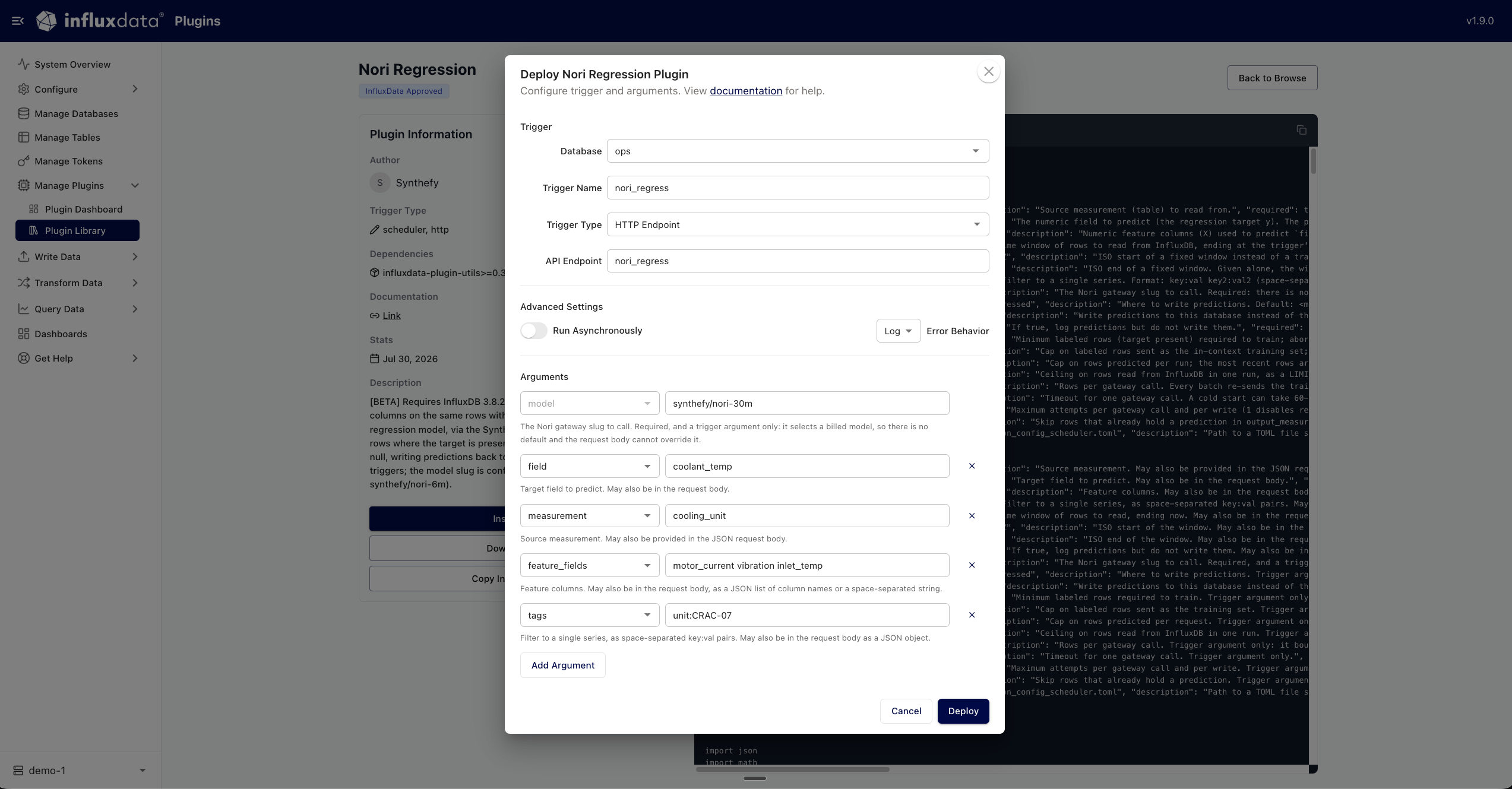
The trigger says which table to read and what to predict. Give it an
**HTTP Endpoint** type so you can run it whenever you want, and add one
argument per row:
| Argument | Value |
| ---------------- | ------------------------------------ |
| `measurement` | `cooling_unit` |
| `field` | `coolant_temp` |
| `feature_fields` | `motor_current vibration inlet_temp` |
| `tags` | `unit:CRAC-07` |
| `model` | `synthefy/nori-30m` |
From the CLI instead:
```bash theme={null}
influxdb3 install package influxdata-plugin-utils requests
```
The trigger says which table to read and what to predict. Give it an
**HTTP Endpoint** type so you can run it whenever you want, and add one
argument per row:
| Argument | Value |
| ---------------- | ------------------------------------ |
| `measurement` | `cooling_unit` |
| `field` | `coolant_temp` |
| `feature_fields` | `motor_current vibration inlet_temp` |
| `tags` | `unit:CRAC-07` |
| `model` | `synthefy/nori-30m` |
 From the CLI instead:
```bash theme={null}
influxdb3 create trigger \
--database ops \
--path "gh:influxdata/nori_regression/nori_regression.py" \
--trigger-spec "request:nori_regress" \
--trigger-arguments measurement=cooling_unit,field=coolant_temp,feature_fields="motor_current vibration inlet_temp",tags=unit:CRAC-07,model=synthefy/nori-30m \
nori_regress
```
Here `feature_fields` and `tags` take space-separated values, because
`--trigger-arguments` splits pairs on commas.
Pass the key as an `X-Nori-Api-Key` header. It never touches your database.
```bash theme={null}
curl -X POST http://localhost:8181/api/v3/engine/nori_regress \
-H "X-Nori-Api-Key: $NORI_API_KEY" \
-H "Content-Type: application/json" \
-d '{}'
```
```json theme={null}
{"status": "success", "task_id": "...", "result": {"status": "success", "written": 2}}
```
`written` is the number of rows filled, the 20:00 and 21:00 rows in the table
above.
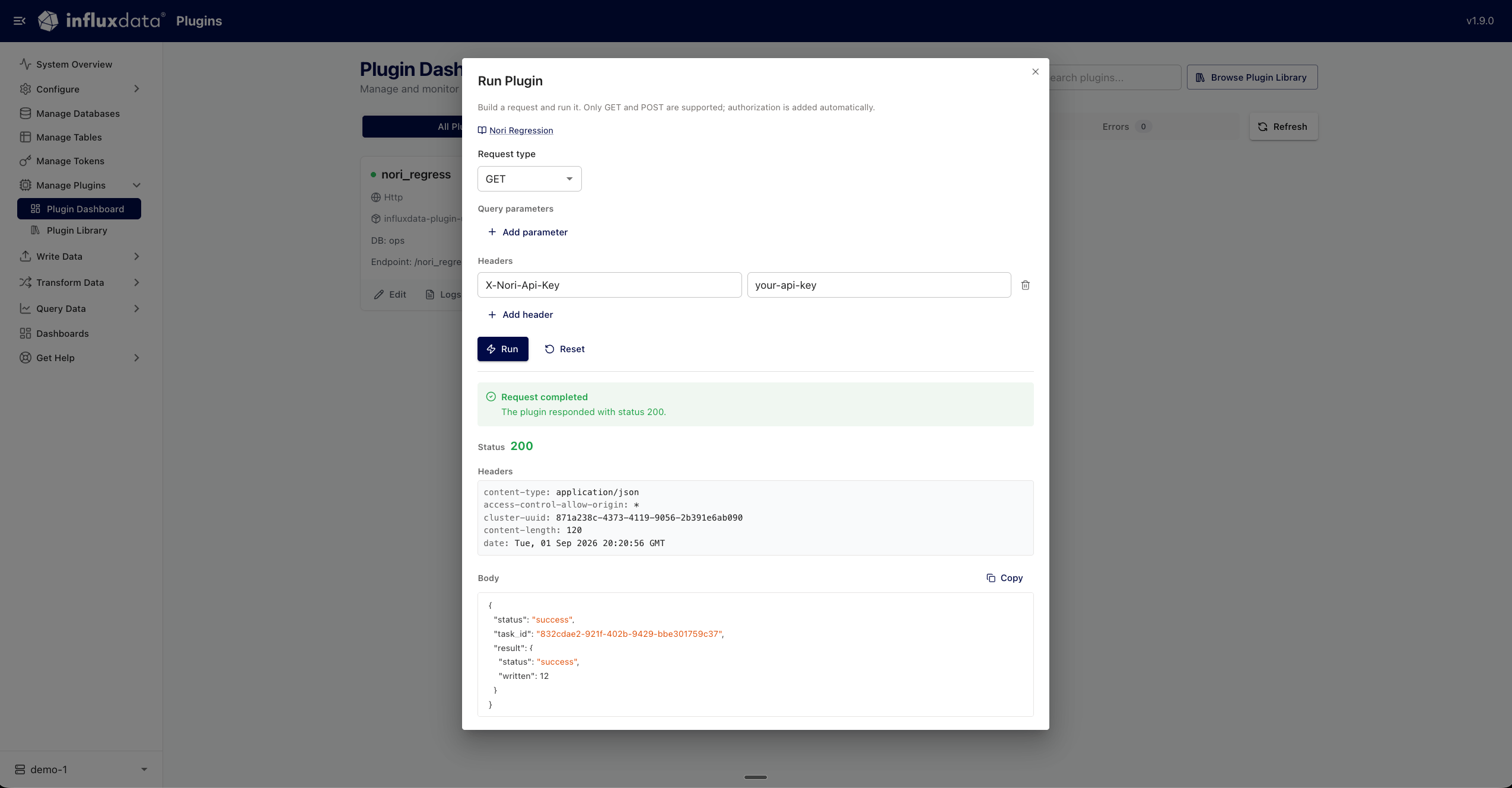
In Explorer, the trigger card has a **Run Now** button that opens a request
builder. Add `X-Nori-Api-Key` under **Headers** and run it there:
From the CLI instead:
```bash theme={null}
influxdb3 create trigger \
--database ops \
--path "gh:influxdata/nori_regression/nori_regression.py" \
--trigger-spec "request:nori_regress" \
--trigger-arguments measurement=cooling_unit,field=coolant_temp,feature_fields="motor_current vibration inlet_temp",tags=unit:CRAC-07,model=synthefy/nori-30m \
nori_regress
```
Here `feature_fields` and `tags` take space-separated values, because
`--trigger-arguments` splits pairs on commas.
Pass the key as an `X-Nori-Api-Key` header. It never touches your database.
```bash theme={null}
curl -X POST http://localhost:8181/api/v3/engine/nori_regress \
-H "X-Nori-Api-Key: $NORI_API_KEY" \
-H "Content-Type: application/json" \
-d '{}'
```
```json theme={null}
{"status": "success", "task_id": "...", "result": {"status": "success", "written": 2}}
```
`written` is the number of rows filled, the 20:00 and 21:00 rows in the table
above.
In Explorer, the trigger card has a **Run Now** button that opens a request
builder. Add `X-Nori-Api-Key` under **Headers** and run it there:
 Do not use the `Authorization` header. InfluxDB reads that one for its own
request authorization, so it never reaches the plugin.
```sql theme={null}
SELECT time, value, model, target, unit
FROM cooling_unit_regressed
WHERE target = 'coolant_temp'
ORDER BY time
```
Each point carries the tags `model`, `source` and `target`, plus every tag of
the row it was predicted for.
The same run can also take an explicit period, or preview without writing:
```bash Backfill a period theme={null}
curl -X POST http://localhost:8181/api/v3/engine/nori_regress \
-H "X-Nori-Api-Key: $NORI_API_KEY" \
-H "Content-Type: application/json" \
-d '{"start_time":"2026-01-01T00:00:00Z","end_time":"2026-02-01T00:00:00Z"}'
```
```bash Preview without writing theme={null}
curl -X POST http://localhost:8181/api/v3/engine/nori_regress \
-H "X-Nori-Api-Key: $NORI_API_KEY" \
-H "Content-Type: application/json" \
-d '{"dry_run":true}'
```
## Closing gaps automatically
To keep a column filled without calling anything, give the trigger a schedule
instead of an endpoint. A scheduled run has no caller to carry a header, so the
key has to be on the InfluxDB server, in the environment of the process itself.
Put the key in the InfluxDB server's environment and restart it:
```bash theme={null}
export SYNTHEFY_NORI_API_KEY=""
```
Set it wherever your InfluxDB process gets its environment: `-e` or
`--env-file` for Docker, `environment:` for Compose, `Environment=` in the
systemd unit, or a `secretKeyRef` in Kubernetes. The plugin reads it from the
server, never from trigger arguments or the request body, because both are
written to logs.
Then create the trigger with a frequency rather than an endpoint. The arguments
are the same:
Do not use the `Authorization` header. InfluxDB reads that one for its own
request authorization, so it never reaches the plugin.
```sql theme={null}
SELECT time, value, model, target, unit
FROM cooling_unit_regressed
WHERE target = 'coolant_temp'
ORDER BY time
```
Each point carries the tags `model`, `source` and `target`, plus every tag of
the row it was predicted for.
The same run can also take an explicit period, or preview without writing:
```bash Backfill a period theme={null}
curl -X POST http://localhost:8181/api/v3/engine/nori_regress \
-H "X-Nori-Api-Key: $NORI_API_KEY" \
-H "Content-Type: application/json" \
-d '{"start_time":"2026-01-01T00:00:00Z","end_time":"2026-02-01T00:00:00Z"}'
```
```bash Preview without writing theme={null}
curl -X POST http://localhost:8181/api/v3/engine/nori_regress \
-H "X-Nori-Api-Key: $NORI_API_KEY" \
-H "Content-Type: application/json" \
-d '{"dry_run":true}'
```
## Closing gaps automatically
To keep a column filled without calling anything, give the trigger a schedule
instead of an endpoint. A scheduled run has no caller to carry a header, so the
key has to be on the InfluxDB server, in the environment of the process itself.
Put the key in the InfluxDB server's environment and restart it:
```bash theme={null}
export SYNTHEFY_NORI_API_KEY=""
```
Set it wherever your InfluxDB process gets its environment: `-e` or
`--env-file` for Docker, `environment:` for Compose, `Environment=` in the
systemd unit, or a `secretKeyRef` in Kubernetes. The plugin reads it from the
server, never from trigger arguments or the request body, because both are
written to logs.
Then create the trigger with a frequency rather than an endpoint. The arguments
are the same:
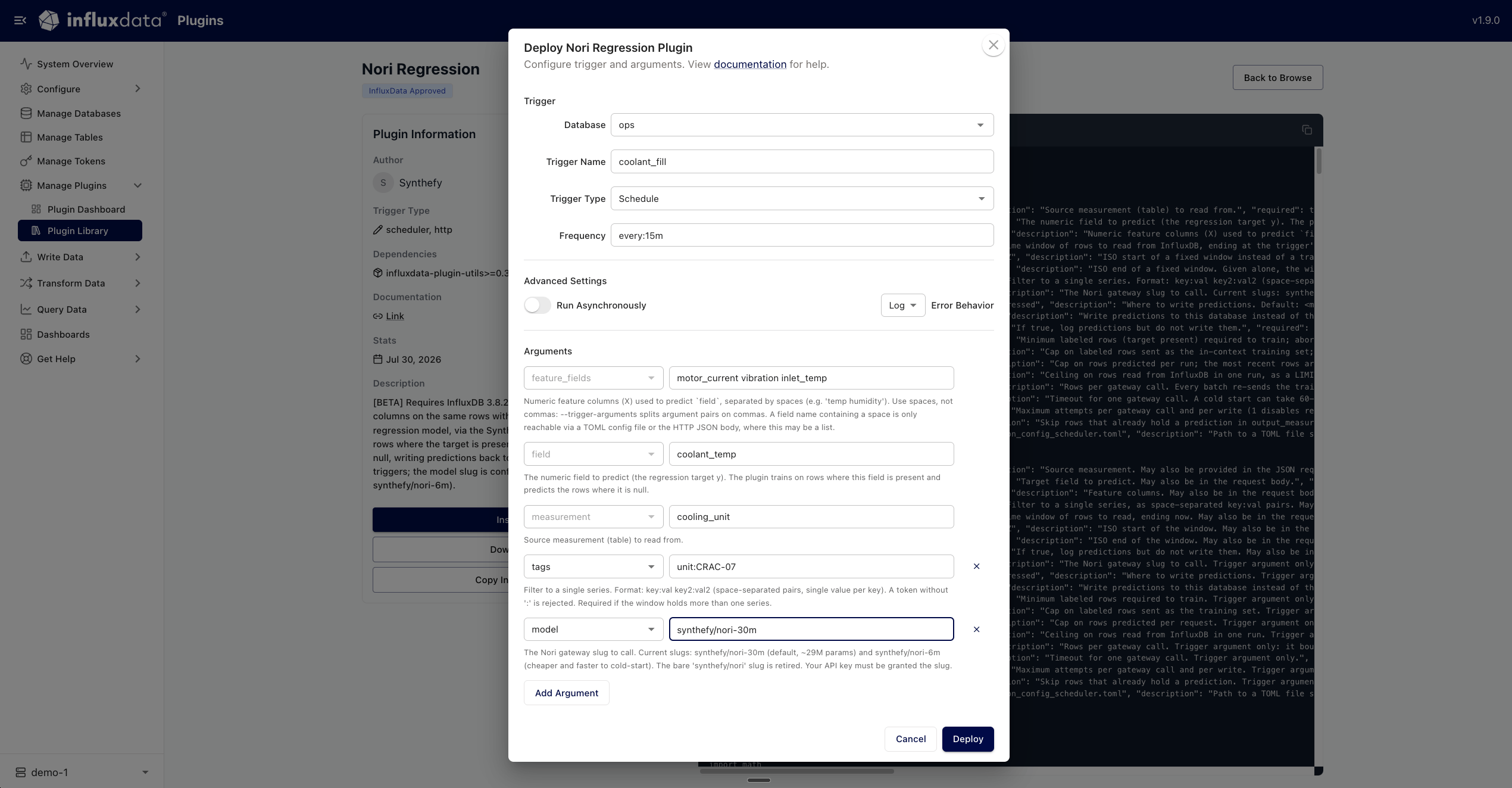 ```bash theme={null}
influxdb3 create trigger \
--database ops \
--path "gh:influxdata/nori_regression/nori_regression.py" \
--trigger-spec "every:15m" \
--trigger-arguments measurement=cooling_unit,field=coolant_temp,feature_fields="motor_current vibration inlet_temp",tags=unit:CRAC-07,model=synthefy/nori-30m \
coolant_fill
```
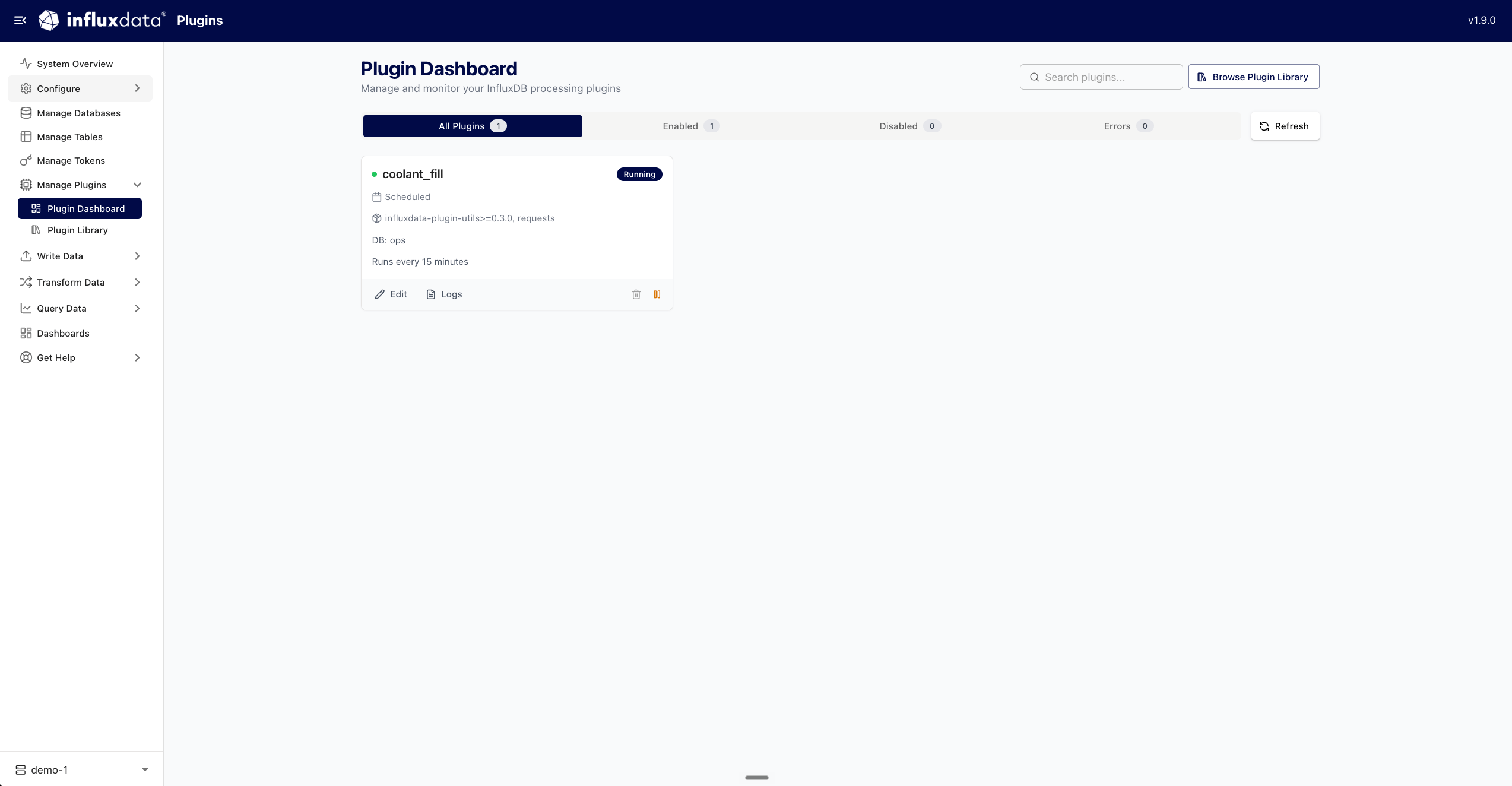
Every 15 minutes it fills any rows missing `coolant_temp` that do not have a
prediction yet, and skips the ones that do, so a repeating schedule does not
pay for the same row twice.
```bash theme={null}
influxdb3 create trigger \
--database ops \
--path "gh:influxdata/nori_regression/nori_regression.py" \
--trigger-spec "every:15m" \
--trigger-arguments measurement=cooling_unit,field=coolant_temp,feature_fields="motor_current vibration inlet_temp",tags=unit:CRAC-07,model=synthefy/nori-30m \
coolant_fill
```
Every 15 minutes it fills any rows missing `coolant_temp` that do not have a
prediction yet, and skips the ones that do, so a repeating schedule does not
pay for the same row twice.
 ## Parameters
| Parameter | Default | What it does |
| ---------------- | -------- | --------------------------------------------------------------------------------------- |
| `measurement` | required | The table to read. |
| `field` | required | The column to predict. |
| `feature_fields` | required | The columns to predict it from, space-separated. |
| `model` | required | The model slug, for example `synthefy/nori-30m`. See [Models](/nori/quickstart#models). |
| `tags` | none | Filter to one series. Required when the window holds more than one. |
| `window` | `30d` | How far back a run reads, ending at the time it runs. |
| `min_history` | `50` | Rows with a value required before a run will call Nori. |
| `max_train_rows` | `1000` | Cap on the example rows sent per call. |
| `skip_existing` | `true` | Skip rows that already have a prediction. |
The full reference, including retry and batching behaviour, is in the
[plugin documentation](https://github.com/influxdata/influxdb3_plugins/blob/main/influxdata/nori_regression/README.md).
## What a run costs
Each call to the gateway is metered on the same request dimensions as a direct API
call: the example rows sent as context and the number of feature columns, reported
in the `usage` object described in the [Quickstart](/nori/quickstart#api).
Three parameters bound what a schedule spends: `max_train_rows` caps the example
rows per call, `predict_batch_size` caps the number of calls, and `skip_existing`
stops a repeating schedule paying again for rows it has already predicted.
## Good to know
**One series per run.** The plugin counts the distinct tag combinations in the
window and stops before calling Nori if there is more than one, so two series
are never fitted as one. Use `tags` to select the series you want.
**The first call after an idle period is slower.** A model that has scaled to
zero takes from about a minute to several to answer. The plugin's
`request_timeout` defaults to `300s` and retries transient failures.
**A row is predicted when the target is empty and every feature column is
present.** Rows missing a feature are left alone.
## Next steps
Call Nori from Snowflake SQL, with no data export.
Deploy Nori as a SageMaker endpoint in your own AWS account.
The model sizes and the request/response contract.
Call the same models from Python.
## Parameters
| Parameter | Default | What it does |
| ---------------- | -------- | --------------------------------------------------------------------------------------- |
| `measurement` | required | The table to read. |
| `field` | required | The column to predict. |
| `feature_fields` | required | The columns to predict it from, space-separated. |
| `model` | required | The model slug, for example `synthefy/nori-30m`. See [Models](/nori/quickstart#models). |
| `tags` | none | Filter to one series. Required when the window holds more than one. |
| `window` | `30d` | How far back a run reads, ending at the time it runs. |
| `min_history` | `50` | Rows with a value required before a run will call Nori. |
| `max_train_rows` | `1000` | Cap on the example rows sent per call. |
| `skip_existing` | `true` | Skip rows that already have a prediction. |
The full reference, including retry and batching behaviour, is in the
[plugin documentation](https://github.com/influxdata/influxdb3_plugins/blob/main/influxdata/nori_regression/README.md).
## What a run costs
Each call to the gateway is metered on the same request dimensions as a direct API
call: the example rows sent as context and the number of feature columns, reported
in the `usage` object described in the [Quickstart](/nori/quickstart#api).
Three parameters bound what a schedule spends: `max_train_rows` caps the example
rows per call, `predict_batch_size` caps the number of calls, and `skip_existing`
stops a repeating schedule paying again for rows it has already predicted.
## Good to know
**One series per run.** The plugin counts the distinct tag combinations in the
window and stops before calling Nori if there is more than one, so two series
are never fitted as one. Use `tags` to select the series you want.
**The first call after an idle period is slower.** A model that has scaled to
zero takes from about a minute to several to answer. The plugin's
`request_timeout` defaults to `300s` and retries transient failures.
**A row is predicted when the target is empty and every feature column is
present.** Rows missing a feature are left alone.
## Next steps
Call Nori from Snowflake SQL, with no data export.
Deploy Nori as a SageMaker endpoint in your own AWS account.
The model sizes and the request/response contract.
Call the same models from Python.