> ## Documentation Index
> Fetch the complete documentation index at: https://docs.synthefy.com/llms.txt
> Use this file to discover all available pages before exploring further.
# Embeddings
> Extract Nori's learned row representations — out-of-fold training embeddings, test embeddings, and using them as features for downstream models.
Nori's encoder turns every row into a dense vector — a learned representation
that captures how the row relates to the target, conditioned on the rest of your
table. You can pull those vectors out and use them for anything you'd use
features for: a downstream model (kNN, linear probe, gradient boosting),
clustering, nearest-neighbor search, visualization, or meta-learning.
Because `NoriRegressor` is a scikit-learn estimator, embedding extraction plugs
straight into the sklearn ecosystem. There are two entry points:
* **`NoriEmbedding`** — an sklearn transformer. With `n_fold >= 2` it produces
**out-of-fold** (leak-free) embeddings for the training rows. Recommended.
* **`NoriRegressor.get_embeddings`** — the low-level call, when you want direct
control over which rows are embedded against which context.
Nori is **regression-only**, so embeddings are conditioned on a continuous
target.
## Install
```bash theme={null}
pip install synthefy-nori
```
Extracting embeddings and fitting downstream heads needs only the base install
(scikit-learn is a core dependency). The t-SNE visualization and the TabArena
example below also need `matplotlib` (and `openml` for TabArena), which come with
the `eval` extra:
```bash theme={null}
pip install "synthefy-nori[eval]"
```
Model weights download automatically from Hugging Face on first use — no API key
needed. Nori uses a GPU if one is available, otherwise CPU.
## The interface
`NoriEmbedding` is a scikit-learn transformer with two methods:
* **`fit_transform(X_train, y_train)`** — returns embeddings for the training
rows. Out-of-fold when `n_fold >= 2` (see below).
* **`transform(X)`** — returns embeddings for unseen rows, always from the final
model fit on the full training set.
`transform` never returns cached training embeddings, even if the input happens
to equal the training set. For training-row embeddings use `fit_transform` (or
read `train_embeddings_`).
Both return a 3-D array of shape `(n_estimators, n_samples, embed_dim)`, where
`n_estimators` is the number of preprocessing pipelines in the inference
ensemble. Average over the ensemble axis (or pick a single member) for a 2-D
matrix a downstream estimator can consume:
```python theme={null}
Z_train = train_emb.mean(axis=0) # (n_samples, embed_dim)
# or: Z_train = train_emb[0]
```
## Out-of-fold embeddings (recommended)
With `n_fold >= 2`, `fit_transform` runs K-fold cross-validation: each training
row is embedded by a fold model that did **not** have it in its context, so the
embedding never leaks that row's own label. This matters whenever you fit a
downstream model on the training embeddings — leak-free embeddings give an
honest estimate of downstream performance
([arXiv:2502.17361](https://arxiv.org/abs/2502.17361)). Unseen rows are then
embedded by a single model fit on the full training set.
```python theme={null}
from synthefy_nori import NoriEmbedding, NoriRegressor
embedder = NoriEmbedding(n_fold=5, shuffle=True, random_state=0)
train_emb = embedder.fit_transform(X_train, y_train) # out-of-fold (leak-free)
test_emb = embedder.transform(X_test) # final full-data model
Z_train = train_emb.mean(axis=0) # (n_train, embed_dim)
Z_test = test_emb.mean(axis=0) # (n_test, embed_dim)
```
`KFold` is used for the splits; pass `shuffle=True` with a `random_state` to
shuffle. To reuse a specific configuration (e.g. skip compilation for many small
fold-fits), hand `NoriEmbedding` a pre-built estimator:
```python theme={null}
embedder = NoriEmbedding(
n_fold=5, shuffle=True, random_state=0,
model=NoriRegressor(compile_model=False),
)
```
## Vanilla embeddings
With `n_fold=0`, a single model is fit on the entire training set and used for
both train and unseen rows. It's cheaper — one fit instead of `n_fold + 1` — but
the training embeddings encode their own labels, so don't fit a downstream model
on them and expect an unbiased score.
```python theme={null}
embedder = NoriEmbedding(n_fold=0)
train_emb = embedder.fit_transform(X_train, y_train) # not leak-free
```
## The low-level call
`NoriRegressor.get_embeddings(X, data_source=...)` embeds rows against the
context stored by `fit`. `data_source` selects which rows come back:
* **`"test"`** (default) — embed the query rows `X`.
* **`"train"`** — embed the stored **context** rows. `X` is ignored here (the
representations depend only on what you passed to `fit`), so you can omit it.
```python theme={null}
from synthefy_nori import NoriRegressor
model = NoriRegressor().fit(X_train, y_train)
test_emb = model.get_embeddings(X_test, data_source="test") # query rows
train_emb = model.get_embeddings(data_source="train") # context rows
```
These embeddings come from the full-data model, so the `"train"` rows encode
their own labels — for leak-free training embeddings use `NoriEmbedding` with
`n_fold >= 2`.
## Using embeddings as features
Once you have a 2-D matrix, any sklearn estimator works. A nearest-neighbor
regressor on the embeddings:
```python theme={null}
from sklearn.neighbors import KNeighborsRegressor
from sklearn.metrics import r2_score
knn = KNeighborsRegressor(n_neighbors=10).fit(Z_train, y_train)
print(r2_score(y_test, knn.predict(Z_test)))
```
Or a linear probe (standardize first for ridge/SVM/MLP heads):
```python theme={null}
from sklearn.linear_model import RidgeCV
from sklearn.pipeline import make_pipeline
from sklearn.preprocessing import StandardScaler
probe = make_pipeline(StandardScaler(), RidgeCV(alphas=(0.1, 1.0, 10.0, 100.0)))
probe.fit(Z_train, y_train)
print(r2_score(y_test, probe.predict(Z_test)))
```
The same vectors feed clustering, nearest-neighbor search, or a 2-D projection
for visualization.
## Visualizing the geometry
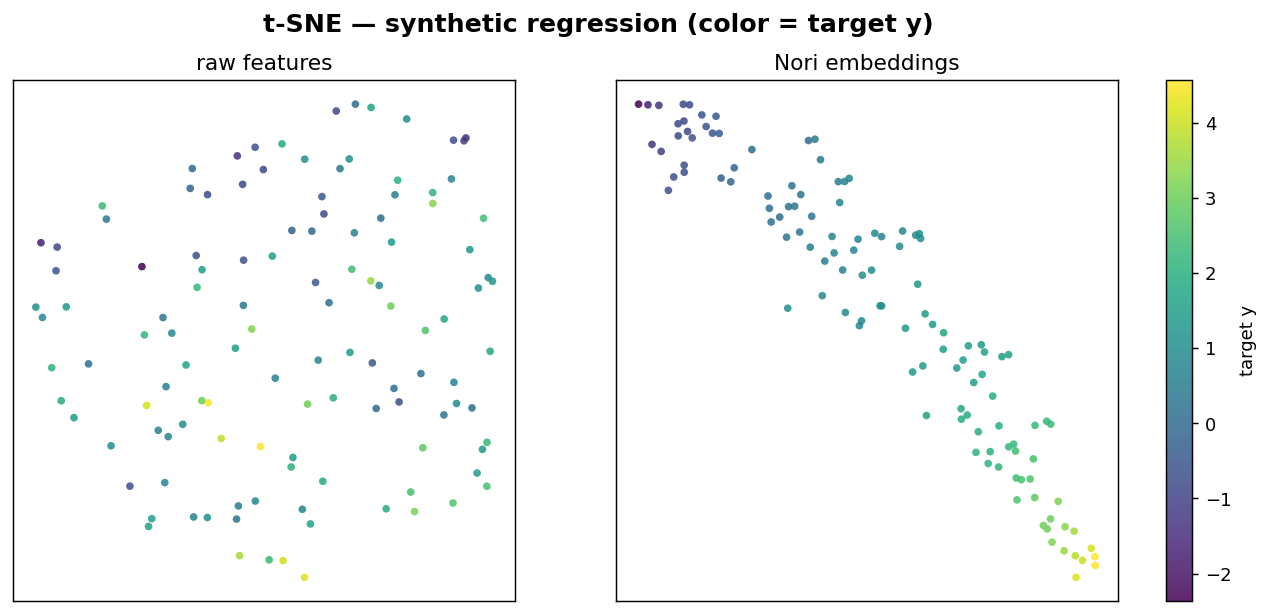
Because the embeddings are organized by the target, a 2-D t-SNE of the
embeddings separates rows by their target value far more cleanly than a t-SNE of
the raw features — a quick visual check that the representation captures what
you're predicting.
 ```python theme={null}
from sklearn.manifold import TSNE
from sklearn.preprocessing import StandardScaler
emb_2d = TSNE(n_components=2, init="pca", random_state=0).fit_transform(
StandardScaler().fit_transform(Z_test)
)
# scatter emb_2d colored by y_test
```
## Parameters
`NoriEmbedding`:
| Parameter | Default | Description |
| -------------- | ------- | ------------------------------------------------------------------------------------------------- |
| `n_fold` | `0` | Number of CV folds. `0` = vanilla (single model); `>= 2` enables out-of-fold training embeddings. |
| `model` | `None` | A pre-configured `NoriRegressor`. When `None`, a default one is built at `fit` time. |
| `shuffle` | `False` | Whether to shuffle the K-fold split. |
| `random_state` | `None` | Seed for the split when `shuffle=True`. |
After `fit`, the transformer exposes `model_` (the full-data model) and
`train_embeddings_` (the training embeddings — out-of-fold when `n_fold >= 2`).
## Notes
* These run on the **local Python package** (`synthefy-nori`), not the hosted
API — extraction returns per-row vectors rather than predictions.
* Use **out-of-fold** embeddings (`n_fold >= 2`) whenever you train a downstream
model on the training rows; vanilla embeddings leak the label.
* Embeddings are shape `(n_estimators, n_samples, embed_dim)` — average over
`axis=0` (or select `[0]`) before passing them to a 2-D estimator.
```python theme={null}
from sklearn.manifold import TSNE
from sklearn.preprocessing import StandardScaler
emb_2d = TSNE(n_components=2, init="pca", random_state=0).fit_transform(
StandardScaler().fit_transform(Z_test)
)
# scatter emb_2d colored by y_test
```
## Parameters
`NoriEmbedding`:
| Parameter | Default | Description |
| -------------- | ------- | ------------------------------------------------------------------------------------------------- |
| `n_fold` | `0` | Number of CV folds. `0` = vanilla (single model); `>= 2` enables out-of-fold training embeddings. |
| `model` | `None` | A pre-configured `NoriRegressor`. When `None`, a default one is built at `fit` time. |
| `shuffle` | `False` | Whether to shuffle the K-fold split. |
| `random_state` | `None` | Seed for the split when `shuffle=True`. |
After `fit`, the transformer exposes `model_` (the full-data model) and
`train_embeddings_` (the training embeddings — out-of-fold when `n_fold >= 2`).
## Notes
* These run on the **local Python package** (`synthefy-nori`), not the hosted
API — extraction returns per-row vectors rather than predictions.
* Use **out-of-fold** embeddings (`n_fold >= 2`) whenever you train a downstream
model on the training rows; vanilla embeddings leak the label.
* Embeddings are shape `(n_estimators, n_samples, embed_dim)` — average over
`axis=0` (or select `[0]`) before passing them to a 2-D estimator.